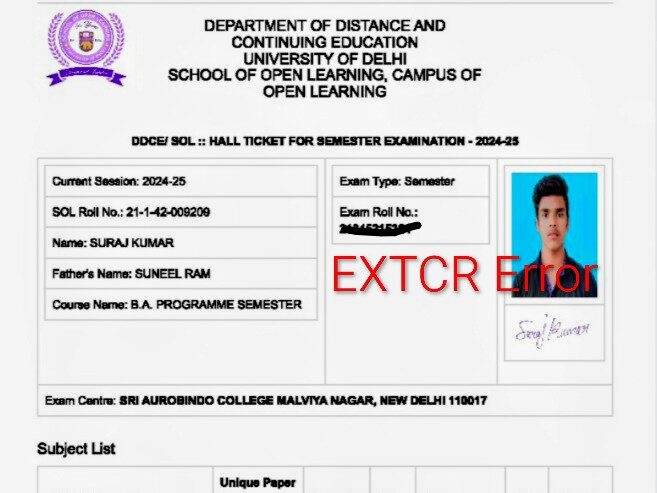
The DU SOL May-June 2026 examinations are just around the corner, and the wait for the admit cards has been a rollercoaster for many. While the University of Delhi (DU) and the School of Open Learning (SOL) have begun releasing hall tickets, thousands of students are reporting technical glitches, missing links, and a mysterious code: “EXTCR.”
If you are a DU SOL student panicking about your admit card status, this guide is for you. We break down exactly how to download your hall ticket and what to do if your card looks “broken.”
Topics Discussed
1. What is the “EXTCR” Problem in DU SOL Admit Card 2026?
The most common issue students are facing this year is the appearance of the code “EXTCR” in the “Paper Type” column. Usually, this section should display categories like DSC, GE, SEC, or VAC.
Is “EXTCR” an error?
Technically, yes, but it is a portal-wide glitch, not a mistake on your part.
- The Cause: It appears to be a backend placeholder code on the Samarth Portal that failed to update to the correct subject category before the rollout.
- The Solution: If your Subject Names and Exam Dates are correct, you do not need to worry. The university is aware of the issue, and most centers are being instructed to accept these admit cards.
2. Step-by-Step: How to Download DU SOL Admit Card 2026
Follow these steps to access your hall ticket via the official Samarth Portal:
- Visit the Official Portal: Go to the DU Samarth Exam Portal.
- Login: Enter your Enrollment Number and Password.
- Navigate to Services: Once logged in, click on the “Services” or “Examination” tab.
- Download Hall Ticket: Look for the link titled “Download Hall Ticket / Admit Card 2026.”
- Print & Save: Always save a PDF copy and take at least two physical printouts. (Note: Mobile copies are often not allowed at the exam center).
3. Common Issues & Quick Fixes
Aside from the “EXTCR” glitch, here are other common problems students are encountering:
Admit Card “Not Verified”
If your dashboard says “Your Admit Card has not been verified by the College,” don’t panic. Following the deadline extension to May 9, 2026, the administration is currently processing a massive backlog of forms. Verification usually takes 24 to 48 hours after fee submission.
Missing Photo or Signature
If your admit card is blank where your photo should be:
- Try downloading it using Incognito Mode or a different browser (Chrome is recommended).
- If it still doesn’t appear, paste a recent passport-size photograph on the printed card and get it attested by a Gazetted Officer or at the SOL office.
Link Not Appearing
If you don’t see a download link at all:
- Ensure your Exam Fee status shows as “Successful.”
- If you paid your fee recently, wait until the next evening for the portal to update.
4. When to Visit North or South Campus?
We know the Delhi heat is brutal, but in some cases, a physical visit to the SOL campus is mandatory. You should visit the SOL North Campus (Cavalry Lane) or South Campus (Moti Bagh) if:
- Your exam is in less than 48 hours and you still have no link.
- Your subjects are completely wrong (e.g., you see Political Science instead of History).
- Your fee was deducted but your dashboard says “Payment Failed.”
Carry these documents: Fee Receipt, SOL ID Card, and a government ID (Aadhaar Card). If you have any doubts, you can ask in the comments.